- Registrado
- 14 de Nov, 2012
hello lads, hope everyone is having a good weekend. I need your help.
https://kiwifarms.net/
You have to copypaste this because the forum rewrites URLs for our alternative domains to .st at the moment.
If you put in this URL and do not get redirected to .st, your DNS provider is blocking your request. Your NS is either manually set (you'd know if you did), your ISP's default NS, or your privacy tool's (VPN, custom router os, or adblocker tools like Pihole). Privacy tools (particularly VPNs) set your DNS to their own so that your domain lookups don't go to your ISP. Your ISP can and will keep logs of what URLs you're visiting.
DNS is thereby the easiest way to censor a specific website. When countries want to block specific domains, they tell ISPs to lie that websites do not exist if you try to access them. So when you try to lookup 'kiwifarms.net', you get "no results found".
Privacy Tools like Pihole and VPNs often include adblockers and antimalware as well. This is so if a virus uses an evil domain like 'myevilpayload.ru', when your infected computer attempts to contact that domain to exfiltrate your passwords to a hacker, it fails to do so. That's what they advertise.
However, these security blacklists are open source, and by open source I mean some fat retard tranny somewhere runs a repository and adds whatever the fuck he wants to it.
ProtonVPN in particular has been told many, many times that they incorporate a blocklist which blocks the .net domain. They completely refuse to take action. I have no idea what they want. I've tried contacting various blocklist maintainers and don't get replies - surprise! because they're fat retard trannies.
I want to return the site to .net eventually but to accomplish this I must first get the fat retard trannies to unblock our domain. This is where you come in.
You can confirm if your DNS is blocking the .net by either going to .net manually. If you're not redirected, you're blocked. You can verify this using a command in the Windows Command Prompt: nslookup kiwifarms.net - see below.
A failed result looks like this.
Q.E.D., with ProtonVPN, this is what it looks like:
IPs that start with 10. are local networks - your DNS server is running on your computer via ProtonVPN, which is using a bunch of tranny blocklists to censor supposedly bad websites. This is advertised as NetShield on their side, and yes that 1 "tracker blocked" is the nslookup I just did.
 Proton has finally convinced their upstream blacklist to remove us.
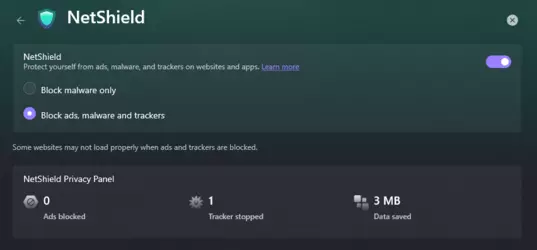
You could just disable this, but why should you? File a complaint.

Í've done this before and the CSR response is "not my problem". I disagree. I literally recommend Proton to people as a service they should use, and the product they sell to people rewards me by enabling some fat tranny retard to censor their own customers. That's their problem. If you're a ProtonVPN customer, file a complaint.
If you use any other privacy service that refuses to resolve .net, complain to them.
I'm sick of this shit. Trannies lost. The vestiges of their technocratic dictatorship are to be destroyed.
Before reporting something works, check that your DNS setting for Tracking/Malware is ON, and make (if you previously accessed .net and got a redirect) use a private browser window or another browser so that DNS caching is not a factor.
Confirmed working:
✔ CyberGhost
✔ DuckDuckGo
✔ ExpressVPN
✔ Mullvad VPN
✔ Mullvad Browser
✔ NordVPN
✔ ProtonVPN (with or without NetShield! Thank you)
✔ PureVPN
Confirmed Blocked
✘ iVPN "Restrictive"
https://kiwifarms.net/
You have to copypaste this because the forum rewrites URLs for our alternative domains to .st at the moment.
If you put in this URL and do not get redirected to .st, your DNS provider is blocking your request. Your NS is either manually set (you'd know if you did), your ISP's default NS, or your privacy tool's (VPN, custom router os, or adblocker tools like Pihole). Privacy tools (particularly VPNs) set your DNS to their own so that your domain lookups don't go to your ISP. Your ISP can and will keep logs of what URLs you're visiting.
DNS is thereby the easiest way to censor a specific website. When countries want to block specific domains, they tell ISPs to lie that websites do not exist if you try to access them. So when you try to lookup 'kiwifarms.net', you get "no results found".
Privacy Tools like Pihole and VPNs often include adblockers and antimalware as well. This is so if a virus uses an evil domain like 'myevilpayload.ru', when your infected computer attempts to contact that domain to exfiltrate your passwords to a hacker, it fails to do so. That's what they advertise.
However, these security blacklists are open source, and by open source I mean some fat retard tranny somewhere runs a repository and adds whatever the fuck he wants to it.
ProtonVPN in particular has been told many, many times that they incorporate a blocklist which blocks the .net domain. They completely refuse to take action. I have no idea what they want. I've tried contacting various blocklist maintainers and don't get replies - surprise! because they're fat retard trannies.
I want to return the site to .net eventually but to accomplish this I must first get the fat retard trannies to unblock our domain. This is where you come in.
You can confirm if your DNS is blocking the .net by either going to .net manually. If you're not redirected, you're blocked. You can verify this using a command in the Windows Command Prompt: nslookup kiwifarms.net - see below.
Código:
>nslookup kiwifarms.net
Server:  dns.google
Address:  8.8.8.8

Non-authoritative answer:
Name:    kiwifarms.net
Addresses:  2a0c:5700:3133:650:8a3a:d5ff:fe51:67d6
A failed result looks like this.
Código:
>nslookup kiwifarms.doesnotexist
Server:  dns.google
Address:  8.8.8.8

*** dns.google can't find kiwifarms.doesnotexist: Non-existent domain
Q.E.D., with ProtonVPN, this is what it looks like:
Código:
>nslookup kiwifarms.net
Server:  UnKnown
Address:  10.2.0.1

*** UnKnown can't find kiwifarms.net: Non-existent domain
IPs that start with 10. are local networks - your DNS server is running on your computer via ProtonVPN, which is using a bunch of tranny blocklists to censor supposedly bad websites. This is advertised as NetShield on their side, and yes that 1 "tracker blocked" is the nslookup I just did.
Proton has finally convinced their upstream blacklist to remove us.
You could just disable this, but why should you? File a complaint.

Í've done this before and the CSR response is "not my problem". I disagree. I literally recommend Proton to people as a service they should use, and the product they sell to people rewards me by enabling some fat tranny retard to censor their own customers. That's their problem. If you're a ProtonVPN customer, file a complaint.
If you use any other privacy service that refuses to resolve .net, complain to them.
I'm sick of this shit. Trannies lost. The vestiges of their technocratic dictatorship are to be destroyed.
Before reporting something works, check that your DNS setting for Tracking/Malware is ON, and make (if you previously accessed .net and got a redirect) use a private browser window or another browser so that DNS caching is not a factor.
Confirmed working:
✔ CyberGhost
✔ DuckDuckGo
✔ ExpressVPN
✔ Mullvad VPN
✔ Mullvad Browser
✔ NordVPN
✔ ProtonVPN (with or without NetShield! Thank you)
✔ PureVPN
Confirmed Blocked
✘ iVPN "Restrictive"
Última edición: