3D Computer Graphics General - "Hey guys welcome to another Blender tutorial" *deletes cube* "OK here's how to make a donut"

  • 🔧 Site instability resolved. You can report double-posts and broken attachments. For bigger issues, use the Technical Grievances thread.
    🇵🇦 Nuestro primer dominio localizado está en español en kiwifarms.pa. Our first localized domain is on Spanish on kiwifarms.pa.
  • Want to keep track of this thread?
    Accounts can bookmark posts, watch threads for updates, and jump back to where you stopped reading.
    Create account
Yeah I think Mixamo is designed for organic models as JCT says. Not that I would use it anyway since it's from (((Adobe))). So nah, I think I'll watch some quick videos on basic rigging and do that stuff on my own.
Rigging is not that hard tbh, the basic skeleton anyway. but you will want to learn the weight painting aspect to refine the influence of the deformations up and down the limbs.
I had to do it on a model because the clothing layer was stretching terribly.
 
Rigging is not that hard tbh, the basic skeleton anyway. but you will want to learn the weight painting aspect to refine the influence of the deformations up and down the limbs.
I had to do it on a model because the clothing layer was stretching terribly.
Well see that's the thing the joints on my robots don't deform at all. They all rotate on one or two axis like an action figure. It's all swivels and ball joints between the two objects that form the joint so I'm pretty sure I can just ignore weights entirely.

I have some ideas for a simple robot design that I might try to crank out the following week during my vacation. I'll look into rigging that as practice.
 
Post your stuff as others might be inspired and want to know how you did certain things. I only asked if anybody else actually creates stuff because i was/am starting to feel like this thread was becoming like my blog, and nothing else gets posted here.
I have took a break for a bit as i usually do after i have been grasped by the eye of the sperg. Thinking i might try and make and animate an alien monster of some kind after watching a few tuts but enjoying project zomboid a bit too much atm.
I do create stuff from time to time but recently I've had my schedule occupied with coding/changing careers so I haven't had any spare time to actually finish anything.
1761406370156.png 1761406407940.png
This last one is a bit more weird because I've been a bit more into the idea of creating more cartoony looking stuff (since I find exaggerated facial features and anatomy fun) 1761406437274.png
Still haven't had much time to actually get to sit down and have long periods, I basically sketched all of these in a bit over 5 hours in the past month. If anyone has pointers to where to learn how to exaggerate either in sculpting or drawing, I'd greatly appreciate that.
This is suppose to be the EMS-10 Zudah from Mobile Suit Gundam (MS Igloo). The game was made in 2003 so I tried to replicate the level of detail and polygonal density of the game's original models; I like to think I succeeded. I learned a lot when making this guy.
EMS-10.pngblender_2025-10-10_18-31-28.png


-Also a couple of random things I made for the game:

This is a spiked knuckle shield. I was using this to test out baked ambient occlusion maps and simple drawn on detail as to replicate the look of the original game (it was ancient).
blender_2025-10-10_17-58-08.pngblender_2025-10-10_17-58-23.png
I love it, man. I've wanted to get into hard-surface modeling for a long time but I really don't know where to go besides modeling guns off blueprints.
 
I love it, man. I've wanted to get into hard-surface modeling for a long time but I really don't know where to go besides modeling guns off blueprints.

How I go about it generally is looking at various line art of designs I find appealing. Simply studying the shapes and formations of various real life and fantasy mechanical objects as I've done for years helped me quite a bit but I process things and work at a snail's pace so for you it'll probably come faster. Next if you need help understanding topology I'd also study freely available 3d models of things made for production and video games. Especially models from older video games will help you to understand the methods they used to work with less polygons to achieve an appealing shape. The principle of working with quads also doesn't matter so much with hard surface modeling as nothing deforms. This means you can get away with using tris where convenient and inserting a pole (vertex connecting more than 4 edges) here or there.
 
Wanted to just edit my last post but I guess the timeframe for that has elapsed. Things aren't going as planned. I have a very rough model but it isn't worth posting right now. Sorry guys, it'll come eventually.
 
Anyone here work with Blockbench? It's gimmick is that it's simple for low-poly models, N64/PS1/DC era looking stuff, also loaded with Minecraft support.

Anyways, does anyone know a decent tutorial channel or PDF for designing stuff in it? The devs own tutorial is rather dated. I only ever messed with Blender back in 2014, my knowledge of 3D model is pretty much gone but I'm hoping to get back into it as a hobby once again.
 
Glad to see a 3D general thread, I'll try to post more of my work as I go and bump the thread :biggrin:
I love it, man. I've wanted to get into hard-surface modeling for a long time but I really don't know where to go besides modeling guns off blueprints.
Doing little greebles or just random 'sci-fi' stuff (armor, paneling) is good practice, an example being anything Machine Games or nu-Bethesda. A lot of hard surface modelling is just a basic shapes beveled, subdivided with correct support loops then either merged or booleaned into other suitable objects if not modeled into initially. It's a lot easier to start from a simple object and work your way up accordingly.

This is a VERY basic example, just the general approach. A simple cylinder extruded, beveled, added support loops then subdivided.
1763874081661.png
 
I like to use curved primitives with adjustable segments made using Spin or 100% Percent weighted Bevel and Weld modifiers during blockout, adjust them to match already existing topology and snap vertices where possible to make bool cleanup easier. 100% Percent Bevel + Weld also can make bevels of variable size for things like hand grips.
Cylindrical things (e.g. gun barrel) make it easier to infer object dimensions when you can't do it from reference so that's usually where I start blocking out.

Good learning resources that weren't mentioned yet:
Polycount Sketchbook: Frank Polygon - lots of posts covering subd modeling techniques.
polypen - subd videos. Older practice and industrial design videos are not paywalled.
Mario Elementza - subd videos.
CGDive - Blender rigging courses.
 
Saw This link posted on /3/ and decided to share it here. The gallery section has some pretty neat stuff to look at, I'm a fan of the twistings section.
Screenshot_20251214-173156_1.jpg sculpt5b.jpg
 
Been a while. Burnt myself out again and lost all inspiration but decided to have a go at something different and give grease pencil a try. Have some spare time this week so might spend it creating more stuff and following along 1000031965.png
 
Here's a quick question for all the 3D artists here. Have any of you made a render farm at home? If so, what hardware do you use?
 
Haven't made a farm yet. But I got a 5070TI and 96GBs of ram to handle most scenes outside of Weta quality shit. So unless you wanna be the next Peter Jackson or Zach Snyder, it's probably enough to do most of what you'd need. If you want a farm though you're probably gonna want to go somewhere like VastAI or Runpod and rent a cheap RTX 6000 Pro and AMD Epyc system (Vast offers em for 80 cents an hour). Though I really don't think you need an actual farm.
 
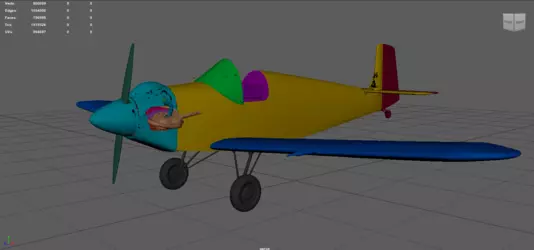
Im doing a 3D model of an airplane for a museum. Its just for rendering purposes, also have a complete engine modeled, so that why is so dense lol.

But after doing the Uv´s. I don´t have the willpower to texture it.


1768958381929.png
 

Archivos adjuntos

  • imagen_2026-01-20_222105792.png
    imagen_2026-01-20_222105792.png
    139.6 KB · Vistas: 46
Decided that seeing as I cannot draw females due to childhood of drawing mortal kombat ninjas and capeshit, that I would study serious art anatomy for 2d portraits for a while, and tonight I bothered to do some 3d sculpting and attempt to create a lifelike human female. these pics are my first attempt and took about 6 hours of scratching away at an initial mesh ball.
anatomy 5.png anatomy 6.png anatomy practice2.png anatomy practice3.png anatomy practice.png anatomy practice4.png
 
Decided that seeing as I cannot draw females due to childhood of drawing mortal kombat ninjas and capeshit, that I would study serious art anatomy for 2d portraits for a while, and tonight I bothered to do some 3d sculpting and attempt to create a lifelike human female. these pics are my first attempt and took about 6 hours of scratching away at an initial mesh ball.
Ver archivo adjunto 8572179Ver archivo adjunto 8572181Ver archivo adjunto 8572185Ver archivo adjunto 8572188Ver archivo adjunto 8572190Ver archivo adjunto 8572192
Looks pretty good. Also, remember, Blender allows you to make VDMS with geometry nodes in scuffed ways that make Zbrush obolete. So everything you did that you think is goood can be reused later through some cool tricks.
With zbrush you would have to project all of that to a plane. With blender you can kinda just do shit that clearly wasn't intended.
 
Looks pretty good. Also, remember, Blender allows you to make VDMS with geometry nodes in scuffed ways that make Zbrush obolete. So everything you did that you think is goood can be reused later through some cool tricks.
With zbrush you would have to project all of that to a plane. With blender you can kinda just do shit that clearly wasn't intended.
That guys channel is full of amazing stuff. I can't wrap my head around how they figure all the node magic out.
 
That guys channel is full of amazing stuff. I can't wrap my head around how they figure all the node magic out.
I mean, I can tell by looking at him that he likes trains if you catch my drift. Plus Geometry Nodes is just Houdini lite. If you translate can use Houdini all of this is probably easy as shit. Though some things require more brain power because Blender doesn't have as many nodes due to them being relatively new for Blender. The point of them is to think procedurally, Look at what you want, and then think how to do it repeatably in an editable process. It's all about automating or reusing your work.
 
Atrás
Top Abajo