
Dual X99
kiwifarms.net
- Registrado
- 27 de Abr, 2025
If you still rely on Google Maps you are missing out on a lot. Here is a comparison between Google Maps and OSMand with the "offroad" map style at Fort Pickens.
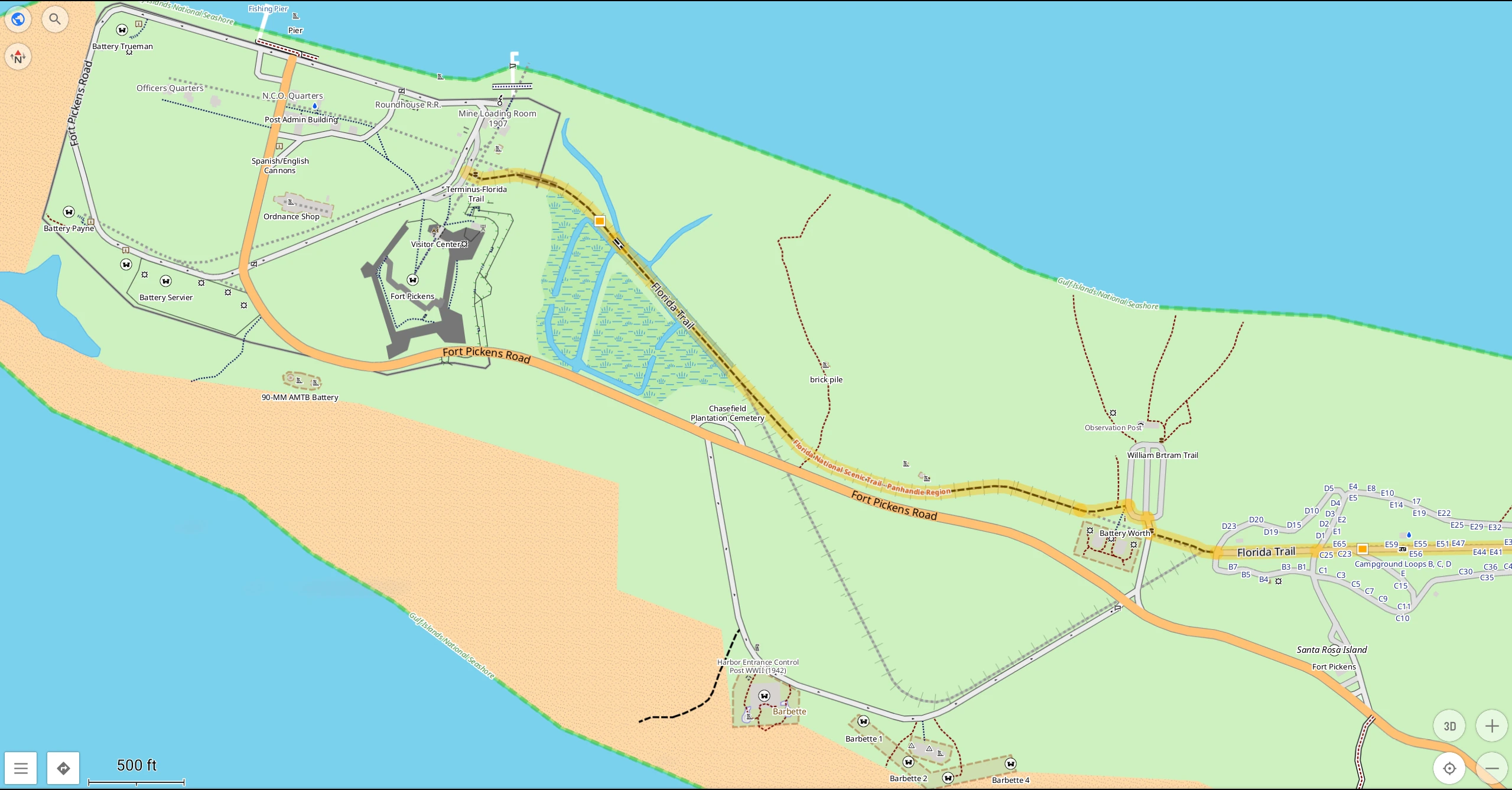
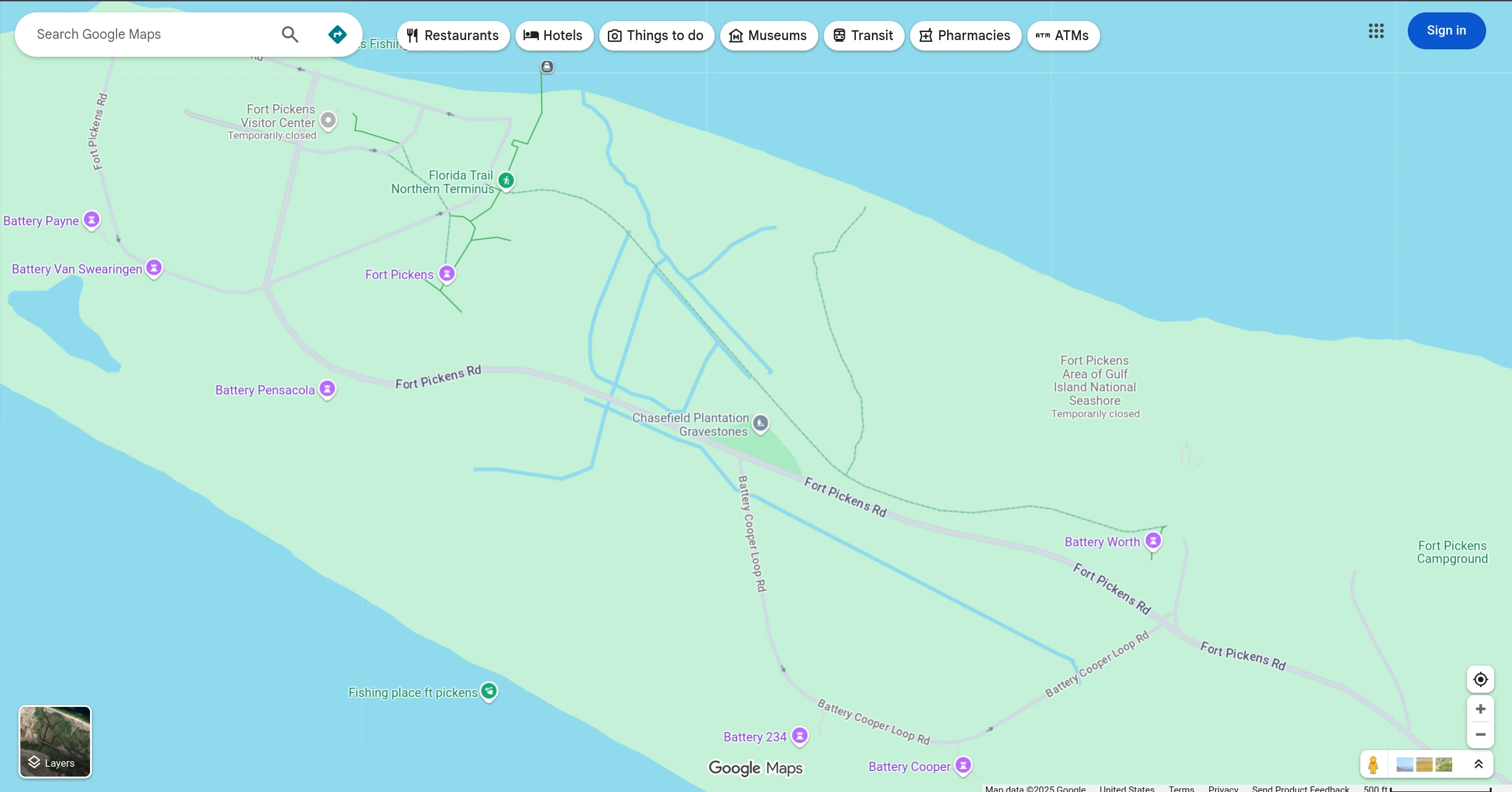
Notice the points of interest have an actual shape and form. Google renders historical WWII artifacts as a teardrop pointer like pointing to a trendy cafe. OSMand gives you a much better idea of the size, entrances, parking, and trails. At the campground, OSM shows you every campsite number so that you don't have to drive in circles or rely on a paper map the ranger gives you. Sure, Google Maps shows you a convenient link with reviews. But who actually needs to read about city slickers complaining about the weather and mosquitos? On the Florida Trail, OSM shows you the color of the blaze that is marked on trees so that you know how to follow the trail.
OpenStreetMap is a database that has a lot of information packed into every single object. Every trail, building, and road has a list of data called "tags" that contain a variable (key) that can be assigned values. For example, a bench can have the key "seats" and be assigned how many people can sit on that bench. However, it is not practical to show all the tags at once on a map. Just like projecting the Earth on a 2D map, renderers pick which data should be thrown out and highlighted.
Default Renderer OpenStreetMap.org hides many precise details. They have a built-in editor and you can see map notes, GPS traces, view all tags under "query features", good for beginner.
Campsites opencampingmap.org highlights all campsites from database. This is useful in combination with freecampsites.net and iOverlander.
Trails with blazes waymarkedtrails.org many renderers do not show trailblazes as they are stored in a relation, but this one highlights national to local routes.
Details and options osmand.net their website map sucks and only their mobile app allows custom map styles. Open source and free on F-Droid, costs on Google Play and Apple. Has offline viewing and packed settings to tailor the renderer to your preference. For desktop, any Android emulator like Waydroid works well enough.
Trail reviews www.alltrails.com requires account, highlights trails from database and provides reviews/pictures from users. Nags a lot for subscription money but free plan works.
For live navigation in a car, OSMand works well for suburban/rural driving. For complex urban freeways, the navigator tells you way too late for lane changes and struggles to only get the information across. For now, Waze is best for urban traffic and routing around accidents/construction. For speeding on long trips, use highwayradar.com that has a historical heatmap of Waze police reports and better notifications of police ahead.
Is there something missing from the map? If you don't want to go through the effort of editing the database, you can contribute GPS traces and map notes on the default renderer and eventually someone will add your information. Use GPSLogger on Android, set to highest logging frequency, and upload the .gpx file. For advanced editing, JOSM gives you complete control over all tags and nodes. There is a bit of a learning curve, but I found their introduction to be very succinct. The OSM wiki is the bible for all tags and standards. Plus, the wiki gives deeper explanation of nodes, ways, and relations if you need more examples.
I made this thread because I am interested in keeping track of development and improvements of the renderers. I like OSMand but they really need a desktop version or a website that doesn't suck. Many renderers lack native implementation of pictures and other information like hours or price of entry without inspecting the tags. The whole project feels like Linux desktop where the idea and versatility is good, but the lack of user-friendly implementation and standardization makes some basic tasks much more difficult than it needs to be.
Notice the points of interest have an actual shape and form. Google renders historical WWII artifacts as a teardrop pointer like pointing to a trendy cafe. OSMand gives you a much better idea of the size, entrances, parking, and trails. At the campground, OSM shows you every campsite number so that you don't have to drive in circles or rely on a paper map the ranger gives you. Sure, Google Maps shows you a convenient link with reviews. But who actually needs to read about city slickers complaining about the weather and mosquitos? On the Florida Trail, OSM shows you the color of the blaze that is marked on trees so that you know how to follow the trail.
OpenStreetMap is a database that has a lot of information packed into every single object. Every trail, building, and road has a list of data called "tags" that contain a variable (key) that can be assigned values. For example, a bench can have the key "seats" and be assigned how many people can sit on that bench. However, it is not practical to show all the tags at once on a map. Just like projecting the Earth on a 2D map, renderers pick which data should be thrown out and highlighted.
Default Renderer OpenStreetMap.org hides many precise details. They have a built-in editor and you can see map notes, GPS traces, view all tags under "query features", good for beginner.
Campsites opencampingmap.org highlights all campsites from database. This is useful in combination with freecampsites.net and iOverlander.
Trails with blazes waymarkedtrails.org many renderers do not show trailblazes as they are stored in a relation, but this one highlights national to local routes.
Details and options osmand.net their website map sucks and only their mobile app allows custom map styles. Open source and free on F-Droid, costs on Google Play and Apple. Has offline viewing and packed settings to tailor the renderer to your preference. For desktop, any Android emulator like Waydroid works well enough.
Trail reviews www.alltrails.com requires account, highlights trails from database and provides reviews/pictures from users. Nags a lot for subscription money but free plan works.
For live navigation in a car, OSMand works well for suburban/rural driving. For complex urban freeways, the navigator tells you way too late for lane changes and struggles to only get the information across. For now, Waze is best for urban traffic and routing around accidents/construction. For speeding on long trips, use highwayradar.com that has a historical heatmap of Waze police reports and better notifications of police ahead.
Is there something missing from the map? If you don't want to go through the effort of editing the database, you can contribute GPS traces and map notes on the default renderer and eventually someone will add your information. Use GPSLogger on Android, set to highest logging frequency, and upload the .gpx file. For advanced editing, JOSM gives you complete control over all tags and nodes. There is a bit of a learning curve, but I found their introduction to be very succinct. The OSM wiki is the bible for all tags and standards. Plus, the wiki gives deeper explanation of nodes, ways, and relations if you need more examples.
I made this thread because I am interested in keeping track of development and improvements of the renderers. I like OSMand but they really need a desktop version or a website that doesn't suck. Many renderers lack native implementation of pictures and other information like hours or price of entry without inspecting the tags. The whole project feels like Linux desktop where the idea and versatility is good, but the lack of user-friendly implementation and standardization makes some basic tasks much more difficult than it needs to be.


