Monitoring CPU fan speed in Windows 10

  • 🇵🇦 Nuestro primer dominio localizado está en español en kiwifarms.pa. Our first localized domain is on Spanish on kiwifarms.pa.
  • Want to keep track of this thread?
    Accounts can bookmark posts, watch threads for updates, and jump back to where you stopped reading.
    Create account

Hentai-Semitism

Shoot videos horizontally, you dunce.
kiwifarms.net
Registrado
16 de Abr, 2025
I was playing around with MSI Afterburner with RTSS and I noticed that it can't display any information about the CPU fan. It looks like I need to install a special driver called PawnIO with kernel level access (???). This concerns both a plugin for MSI Afterburner and a separate program called FanControl. That sounds sketchy as fuck and I'm not interested in monitoring fan speeds THAT much. Why is it such a big deal? Is that driver really required?

My case (Phanteks Enthoo Pro) came with a PWM hub, so I switched to that mode in my MSI BIOS and drew a curve. It seems to work nicely. These are my CPU cooler and my mobo.

Phanteks PWM 1.jpg
PawnIO.jpg
20260103_093326.jpg
 
PawnIO is open source: https://github.com/namazso/PawnIO
FanControl is a very powerful and well established program. Is used to work without PawnIO but recently made the switch to fix a vulnerability. Make of that what you will.
For example it allows you to control your case fans in conjunction with GPU temps. Something that is not possible through bios.

It seems you can only use this hub for fans that you want to run at identical speeds. Afaik it is not a multi-channel fan controller, but I could be wrong.
 
but recently made the switch to fix a vulnerability
Because before that it was using WinRing0 and Microsoft started to detect it as super duper dangerous malware and deleting it, since WinRing0 does what it says on the tin: it gives ring 0 access to the hardware. It wasn't meant to be used as the main dependency for all system hardware monitoring and control as it can also be used with malicious intent, and Microsoft gave people a kick in the ass with that Defender scare to finally switch to other options that aren't as open to misuse as WinRing0.
That being said, yes, FanControl is your best bet to monitor and fine tune your system's fans. By the way, OpenRGB also relied on WinRing0 and has made the switch to PawnIO, and you do need a kernel level driver to control this shit.
 
That being said, yes, FanControl is your best bet to monitor and fine tune your system's fans. By the way, OpenRGB also relied on WinRing0 and has made the switch to PawnIO, and you do need a kernel level driver to control this shit.
Why does something this simple require a driver, though? Was that the case in earlier versions of Windows? I never spent a whole lot of time setting up fan speeds. I was forced to update the BIOS and chipset drivers a week ago when my PC died and I had to set them again. Fine, I guess I'll install PawnIO and see if I even need it.
 
I was playing around with MSI Afterburner with RTSS and I noticed that it can't display any information about the CPU fan. It looks like I need to install a special driver called PawnIO with kernel level access (???). This concerns both a plugin for MSI Afterburner and a separate program called FanControl. That sounds sketchy as fuck and I'm not interested in monitoring fan speeds THAT much. Why is it such a big deal? Is that driver really required?

My case (Phanteks Enthoo Pro) came with a PWM hub, so I switched to that mode in my MSI BIOS and drew a curve. It seems to work nicely. These are my CPU cooler and my mobo.
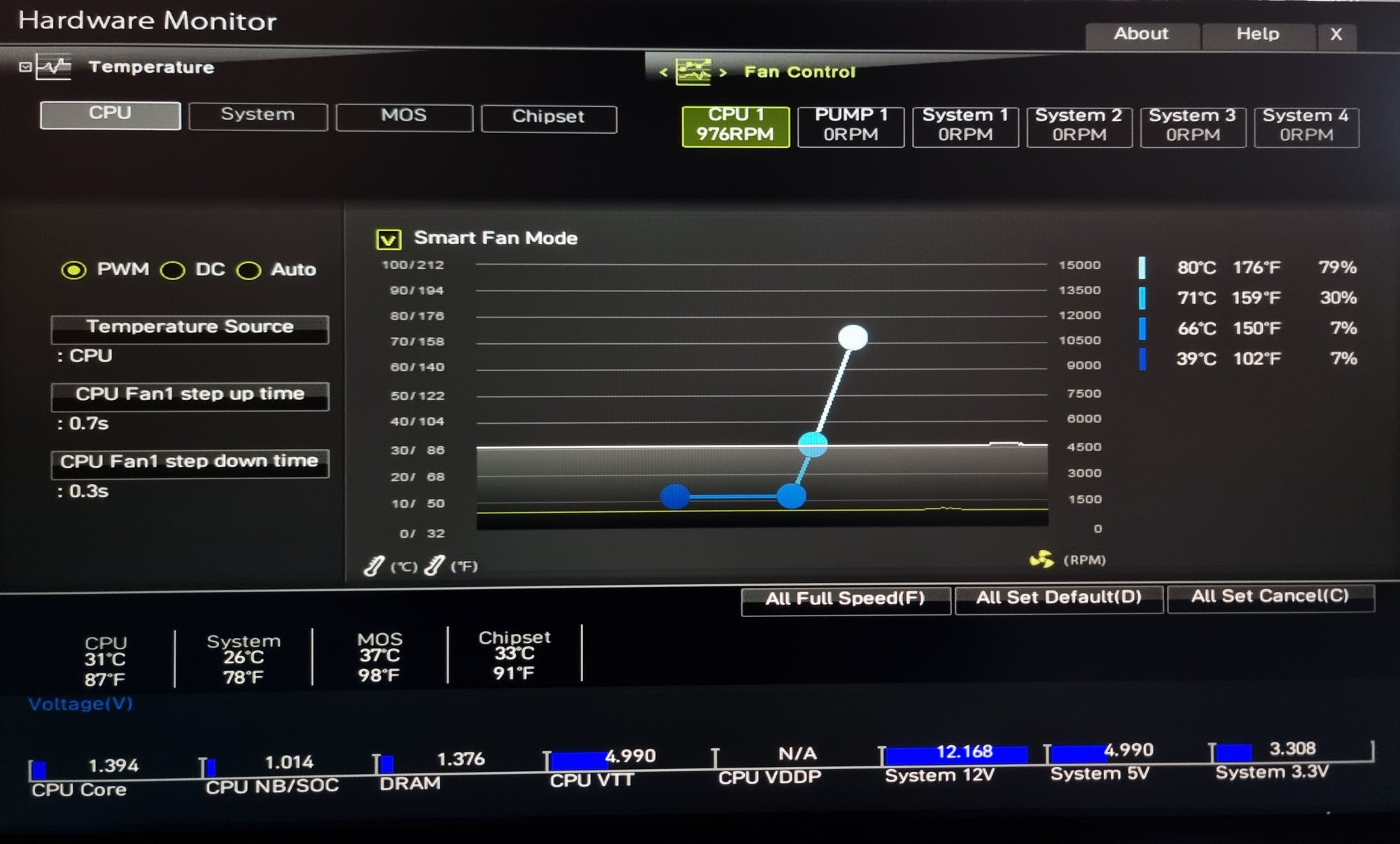
If all you want to do is monitoring the CPU, why doesn't Afterburner work for you? It's had that feature for many years now and I can't recall it installing anything except RivaTuner.
 
If all you want to do is monitoring the CPU, why doesn't Afterburner work for you? It's had that feature for many years now and I can't recall it installing anything except RivaTuner.
It's OK. I'm probably overthinking it. I'll simply experiment with different temp/fan speed curves in BIOS PWM settings. CPU fan speed measured in RPM isn't that imporant.
 
Why does something this simple require a driver, though?
It's due to the companies producing fan and RGB control chips not providing drivers themselves and a lack of standard interface among them making it impossible to produce a generic driver. Applications aren't meant to poke directly at hardware, WinRing0 acted a bridge for them to do this, but it's fundamentally incredibly unsafe. It bypasses the NT kernel's security features since any resource the kernel attempts to protect (e.g. memory) can now be accessed.
If you have a decent CPU cooler just set it at a fixed speed that handles temps and forget about it. Vrm is cooled by cpu fan as well and it needs airflow all the time.
I just set a fan curve in the UEFI that keeps the fans at a constant speed that I find tolerable then if it goes up to 80C for the CPU, everything ramps to 100% until it stops being hot. So far no issues.
 
I've spent some time fine-tuning my curves by hand to my own personal liking of temp/balance, on idle the fans hum silently enough that any other noise from the speakers/headphones will completely drown it and during heavier loads it's still at an acceptable level of loudness despite the fact I've put Arctic Max fans into my rig. IMO it's worth doing undervolting and fan curve tuning by hand once, spend an evening on it, set it and forget it, enjoy the silence.

FanControl gives you way better fineness of how harsh the fan curves should be than the motherboard, and it's also much better to have a piece of software within your OS to do so, as you can simultaneously load your system and fine-tune the curves. With UEFI you need to reboot every time you want to do so and you don't get to tweak them as you're using your PC, which makes a massive difference in how well you can set your curves up. A desktop load, a lightweight gaming load, a heavy gaming load and a stress test to give you a realistic thermal load to fine-tune your fans to.
 
IMO it's worth doing undervolting
I tried that a few months ago, but my PC would restart at random every couple of weeks. Windows Event Logger said it was a "cache hierarchy error" every time, so I reset the voltage to default just to be sure. I'm not saying that's what caused it. I use Ryzen 9 5900X and I found some other people who had the same problem. If it doesn't take a shit by the end of the month, I'm probably OK.

I'm still not sure what caused my PC to turn off completely and refuse to boot up before Christmas. I'd press the power button and it wouldn't react at all. I borrowed a PSU from a friend and after updating the BIOS and chipset drivers it runs fine. It's all so cryptic!
 
I tried that a few months ago, but my PC would restart at random every couple of weeks. Windows Event Logger said it was a "cache hierarchy error" every time, so I reset the voltage to default just to be sure. I'm not saying that's what caused it. I use Ryzen 9 5900X and I found some other people who had the same problem. If it doesn't take a shit by the end of the month, I'm probably OK.

I'm still not sure what caused my PC to turn off completely and refuse to boot up before Christmas. I'd press the power button and it wouldn't react at all. I borrowed a PSU from a friend and after updating the BIOS and chipset drivers it runs fine. It's all so cryptic!
Every time you undervolt your CPU or GPU, you do it in small increments and you run stress tests to ensure the stability of the undervolt. Setting it too low will lead to instabilities, however it cannot physically damage the CPU so restoring the stock settings will solve those issues. For GPU undervolting a reliable test is a 3DMark stress test, if the GPU can pass one without crashing then it's stable. It's a very authentic load compared to something like Furmark that's designed to pull as much power as possible. I didn't UV my CPU since it's a locked Intel chip so I'm SOL, but it's an i5 with a max TDP of 117W so whatever.

Also, switch off the power supply, hit the power button a couple of times, switch the power supply on. Sometimes, take your RAM out and put it in again. Those are the two routines that fix plenty of odd hardware issues.
 
Why does something this simple require a driver, though? Was that the case in earlier versions of Windows? I never spent a whole lot of time setting up fan speeds. I was forced to update the BIOS and chipset drivers a week ago when my PC died and I had to set them again. Fine, I guess I'll install PawnIO and see if I even need it.
Think about it this way: do you want a program like Chrome to be able to fuck around with your fans?
 
If you don't wanna fuck around with the UEFI or drivers, the caveman solution would be snipping the fourth wire on your fan's cable (if it's a 4-pin) or using a header adapter that doesn't allow it (e: that wire) to connect to the board. Won't have to worry about getting fan info onto the OS when the fan's just running at max speed constantly.
 
If you don't wanna fuck around with the UEFI or drivers, the caveman solution would be snipping the fourth wire on your fan's cable (if it's a 4-pin) or using a header adapter that doesn't allow it (e: that wire) to connect to the board. Won't have to worry about getting fan info onto the OS when the fan's just running at max speed constantly.
Yeah, and I'll wear hearing protection instead of headphones. Are CPU coolers with 3 pins even being made anymore? Why would someone not want PWM?
 
Yeah, and I'll wear hearing protection instead of headphones. Are CPU coolers with 3 pins even being made anymore? Why would someone not want PWM?
Not all desktop CPU fans screech at max speed, but it is admittedly a trade-off. I don't notice the noise at all in my setup, but my CPU's fan isn't all that fast to begin with. You could disable PWM physically and not have to think about shit like motherboard drivers and UEFI that's all finicky and coded by AI, or third-party tools. If that cable never connects, a fan will just run at max speed, always, unless your board can't supply it with full power for whatever reason. I think some boards used to allow users to disable PWM in the BIOS back in the day, not sure if it's still the case.
 
Not all desktop CPU fans screech at max speed, but it is admittedly a trade-off. I don't notice the noise at all in my setup, but my CPU's fan isn't all that fast to begin with. You could disable PWM physically and not have to think about shit like motherboard drivers and UEFI that's all finicky and coded by AI, or third-party tools. If that cable never connects, a fan will just run at max speed, always, unless your board can't supply it with full power for whatever reason. I think some boards used to allow users to disable PWM in the BIOS back in the day, not sure if it's still the case.
Fair enough. I probably wouldn't even mind assuming it wouldn't decrease the fans' lifespan. Although I never experienced CPU cooler issues in almost 30 years. The PC would have to be in another room, though.

Let me repeat the other question: are 3-pin CPU coolers still being made? I wouldn't know where to look for that kind of information.
 
Fair enough. I probably wouldn't even mind assuming it wouldn't decrease the fans' lifespan. Although I never experienced CPU cooler issues in almost 30 years. The PC would have to be in another room, though.

Let me repeat the other question: are 3-pin CPU coolers still being made? I wouldn't know where to look for that kind of information.
It's the caveman solution, it will almost certainly make the fan age faster. But would you rather have this relatively cheap, external part of your PC shit itself slightly faster than normal, or your CPU be a nuisance to manage with MSI drivers that might also add 0.05% CPU overhead while suckling on your telemetry data? It's no problem for a responsible user, but the caveman dislikes installing drivers and active involvement in the management of his device, so he has a radical approach that takes a few seconds to handle and he doesn't have to think about it again. Unless his cooler is loud as fuck at max speeds, then he thinks about it every minute that his computer is powered on. Think of it like a last resort, a sloppy, easy way out if everything else is too inconvenient or insufficient.

A 3-pin CPU cooler expects a 3-pin header, so they will only be made as long as boards provide those headers. But those are outdated, so I doubt it will be a blip on your radar unless you actively seek it out.
 
Fair enough. I probably wouldn't even mind assuming it wouldn't decrease the fans' lifespan. Although I never experienced CPU cooler issues in almost 30 years. The PC would have to be in another room, though.

Let me repeat the other question: are 3-pin CPU coolers still being made? I wouldn't know where to look for that kind of information.
You can just replace the fan with literally any other fan that fits into the fan brackets. You can just buy a $20 single tower cooler and use whatever fan you want. On my motherboard, it doesn't even matter if you plug a 4 or a 3 pin fan into the CPU header, the motherboard does a voltage curve if it's not a PWM fan. You get much less control especially at low RPM but it still works totally fine, not all motherboard have that feature though.
 
Atrás
Top Abajo