Make your Kiwifarms images float! - Like an aside, but by having your img on float.

  • 🔧 Site instability resolved. You can report double-posts and broken attachments. For bigger issues, use the Technical Grievances thread.
    🇵🇦 Nuestro primer dominio localizado está en español en kiwifarms.pa. Our first localized domain is on Spanish on kiwifarms.pa.
  • Want to keep track of this thread?
    Accounts can bookmark posts, watch threads for updates, and jump back to where you stopped reading.
    Create account

We Are The Witches

True & Honest Fan
kiwifarms.net
Registrado
23 de Feb, 2019
This is such a basic feature in Xenforo, however very few people use it, and that's to make your images float to the left or right, allowing text to fill the space next to it, from the top falling down instead of the bottom. This will allow you to have a more professional looking post/OP if you're looking for that, or if you want to potentially save space.
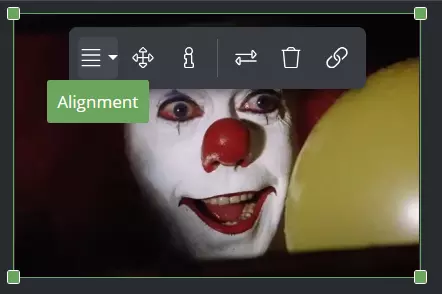
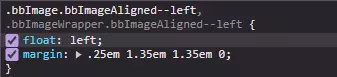
Hi Georgie! Once the image is loaded, you simply have to click on it, then select "Alignment", which is also controlled by the align="" attribute within the [ATTACH] BBCode tag, as well as the alt="" attribute, for accessibility purposes or even secret messages! The alignment will give the image a new class with the float property & the selected value, allowing it to float like a balloon!
They float!


So what are you waiting bucko!? Make 'em float!

 
Anything that uses a fixed width + float is gonna be viewport dependent. Looks like shit on my phone.
1753323510945.webp
 
This is such a basic feature in Xenforo, however very few people use it, and that's to make your images float to the left or right, allowing text to fill the space next to it, from the top falling down instead of the bottom. This will allow you to have a more professional looking post/OP if you're looking for that, or if you want to potentially
Looks like absolute butt on mobile.
IMG_4859.webp
 
Atrás
Top Abajo