Art WIP, Advice & Critique Thread - spammy sister of art thread

  • 🔧 Site instability resolved. You can report double-posts and broken attachments. For bigger issues, use the Technical Grievances thread.
    🇵🇦 Nuestro primer dominio localizado está en español en kiwifarms.pa. Our first localized domain is on Spanish on kiwifarms.pa.
  • Want to keep track of this thread?
    Accounts can bookmark posts, watch threads for updates, and jump back to where you stopped reading.
    Create account
alright todays WIP
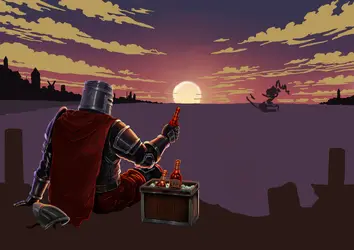
i think im done with the knight and a beer crate mightve missed something so if you have some thoughts say them
i dont mind coming back to him
i still think he kinda lacks sharpness
345.png
and i added a small detail that no one probably will notice
1779488020753.png
i tried to spell goblin brew but i dont think you can write it on such small of a scale
Also, I finally got a pen for my tablet, so I can retire my XP-Pen tablet to “home PC only” duty.
1779488320235.png 1779488344268.png
So maybe talk about peripherals and pens might be in order but not today
 
Última edición:
Starting Painting Process of Trump, hopefully I will get it done for Memorial day, I been using Mad Mag, and caricatures I found online, I found out tho that MAD uses a very thin ink line on the outside, I tried to capture that and the way they do skin tones, I probably could push more oranges and reds but I actually like the results I am getting here, hair was extremely difficult for me and I kinda took cowards way out and avoided details, I also struggle with hands, I really hate hands, especially here, I redrawn and repainted hands over and over quite few times, and even now I am disappointed with them but my eyes are hurting and my dog wants his daily dose of attention, so I am calling it here for now, I will try to make way more progress tomorrow.
250th start.jpg

and i added a small detail that no one probably will notice
Ver archivo adjunto 9044622
i tried to spell goblin brew but i dont think you can write it on such small of a scale
I think you could try to make a bottle bigger, write "Goblin Brew" on it then shrink it down, but even then I don't know if it will really read well at scale down version, It might not even be necessary to do all that anyways. Just throwing idea out there.
Also, I finally got a pen for my tablet, so I can retire my XP-Pen tablet to “home PC only” duty.
Ver archivo adjunto 9044646Ver archivo adjunto 9044648
So maybe talk about peripherals and pens might be in order but not today
I used to own Wacom tablet like that long time ago, like 2012 era time, I hated drawing on it, I prefer to draw on screen, has it feels extremely disconnected to me. Still cool it has button on side, I really like that idea.
 
What do you mean by clean? Also are you trying to draw from reference or from scratch? Also what's the style you are going for?
I mean to make it look nice like how it should, like real or something. My brush overlaps my drawing and it always looks like shit. I'm drawing from scratch. I do not care about style, but anything but cell shaded. If you could give advice, I've been struggle with this for years and cell shaded slop is the only way I've seen to do shading.
 
I mean to make it look nice like how it should, like real or something. My brush overlaps my drawing and it always looks like shit. I'm drawing from scratch. I do not care about style, but anything but cell shaded. If you could give advice, I've been struggle with this for years and cell shaded slop is the only way I've seen to do shading.
No offense but you can't paint if you don't care about style. Painting is about making decisions. It sounds like you're saying you want it to be photorealistic, but you say you aren't using reference?

If your problem is that your brush overlaps, you can try using the lasso tool. I'm using Clip Studio Paint but this is done using a standard lasso + airbrush in every drawing program - apply the lasso tool wherever you want a hard edge, then use the airbrush to create soft edges inside it. Not exactly nice to look at but it took me about 2 minutes.
1779580887463.png 1779580903853.png 1779580932484.png 1779580952869.png


I think this guy is a clickbaiting faggot but he shows off how to use the lasso pretty well in this video.


Most artists don't recommend you learn this way because it results in uniform/boring texture and is kinda clunky. You would do better just painting with a round brush. Start with the biggest shapes, then gradually decrease the size of your brush to work it into smaller shapes.
If you genuinely want to learn how it works, these two videos by Sinix cover how most digital painters do things. Yes he starts you off with 'cel-shaded slop' in the beginner video, then shows how to progress to a painterly style from there.

 
I'm making a Patricksona, so I wanted to see your thoughts about these designs.
maid jen.png
Design 1.
maid rick.png
Design 2.
Piggytits.png
Design 3.

Going for a maid/rococo theming for xher. Xer next design may or may not look drastically different from the maid variants.
 
I think it could use some more finishing touches, but happy about outcome, I did few things to Trump face to make it pop out bit more, I added readish orange around checks and his chin thing, I also add extra high light, I did use lines to help separate things, I think I went over board with American theme, but 250th is very important milestone for us has a country to meet and wanna it to be in for front, I also tried to keep things more simplified to not compete with for Trump has main focus. I also tried to tie in memorial day to this, and I think that was bad Idea in retrospective, I am probably going to remove that and add in Kiwi Farms logo or something has an easter egg, or maybe founding fathers names on it I am unsure.
250th finish.jpg
 

Archivos adjuntos

  • 250th finish.jpg
    250th finish.jpg
    6.4 MB · Vistas: 13
your artstyle is very similar to what @Elite Kipchak is trying to do recently so maybe he can drop in and help you out in more detail
I don't really have anything to add to what's already been said by more knowledgeable parties. plus i've been busy all weekend and don't have anything to post. my main method is to just find specific value shapes and remake them on the canvas. I don't blend that often either in the grayscale stuff you're referring to. a lot of light and layered brushstrokes, with a little blending at the end if i feel like it. edges are the important bit. form shadows usually have softer edges, cast shadows usually have harder edges.

it's all value, value is the most important thing and hard to control. i also try to avoid pure white and pure black now, makes it look a little better imo.

Cast-and-Form-Shadow-Diagram.jpg
 
I mean to make it look nice like how it should, like real or something. My brush overlaps my drawing and it always looks like shit. I'm drawing from scratch. I do not care about style, but anything but cell shaded. If you could give advice, I've been struggle with this for years and cell shaded slop is the only way I've seen to do shading.
So I would agree with Sheep King's point that you kinda need a style that you are going for since it can help you make decisions about what you even want it to look like. Also to some degree art is going to be messy. It's kinda impossible for something to be perfectly clean/rendered(I can sperg more about this). That's why it can be good to find some artists who make art that you like so you can analyze their style and get idea of what good looks like to you(big difference between something like realism and anime). Also having a reference can help you figure out where you are going wrong and where you can improve! I can kinda show you my process, however it might not meet your wants since it's probably on the messier side.

Everything here was done by three brushes.
Mainly these two:
Screenshot from 2026-05-24 20-15-01.pngScreenshot from 2026-05-24 20-14-14.png
Then a little bit of
Screenshot from 2026-05-24 20-15-19.png

This is just to show that you don't need anything fancy since krita comes with these brushes. Also I looked up a whole bunch of references to make this drawing. References help with a lot of things. But mainly anatomy and the best way to render the values.


First start with a sketch. This should be something which is good enough for you. Something that helps you understand the form of what you are working on.
help1.png

Then you can clean up the sketch. I like doing this by just color picking white and layering it over the sketch. For example in the face I just press hard and completely remove it. Though for the torso I do it lightly just to soften the edges. This should also furthering the definition of the form. For example I still have a hard edge at the collar bones (hard dark line) where as the ribcage/oblique area is much softer shading.
help2.png

Normally I would start adding color on this step, but since this is grey scale I just use your base color. I will use the air brush and just do it on top (again everything in on one layer). I might layer it more in areas where I know there will be shading. For example on the thighs I layered the air brush more.
help3.png


Now you color pick and render the edges and fix the anatomy.
help4.png
help5.png
help6.png
help7.png
help8.png
help9.png
help10.png
help11.png

Softening the edges with air brushing lightly and largely, then redefining edges where it needs it (Again this is where anatomy references com in handy). Zooming in further so you can see the need for refinement then refining. Then you basically just keep going until you think it's good enough. A lot of the blending is just the air brush. Very rarely did I find the need to use the smudge tool. Generally I like using it for evening out an area. Or "erasing" a weird dark or light spot. Also past the sketch phase I leaned towards the air brush tool.

To show this on a smaller scale lets look at the neck muscles.
not looking too bad but there is some fuzziness and lack of definition.
help1.1.png

First based on the anatomy references I have I will block out some colors and redefine edges (again with the airbrush tool). Pressing down harder and making it smaller. Sometimes making one pass then making another pass with the darkness of the hair(or what ever area it's up against) to make the edge sharper.
help1.2.png

Then I will make the air brush a little bigger and then color pick similar colors and press less heavy and just smooth it. You can see on the throat, the shadow is softer. As well as the right side of the neck I softened that area up as well.
help1.3.png

Then I use a little bit of darkness and lightness (though not in this case, I only needed more darkness) to re-establish the contrast the shadows which was lost a bit from step 1 to step 3.
help1.4.png


As you can see there is dimishes returns at some point. Also I like to make a duplicated new layer every so often so I can compare the newest version to older versions (especially the sketch and initial rendering). Since I can ensure I am not loosing the appeal or the pose of the sketch.


A lot of this is ultimately down to technique and also your own taste. I find it best to study by looking at real images of real people and practicing off of that and also looking at art from artists you like. The former helps you understand reality better, and the later helps you understand how you want to render that reality better.
 

Archivos adjuntos

  • Screenshot from 2026-05-24 20-15-19.png
    Screenshot from 2026-05-24 20-15-19.png
    10.1 KB · Vistas: 9
Última edición:
Looking for advice or any suggestions on this next project, I am planning to do a dogfight scene, and main character thing, something to make it more appealing. These are some rough drafts of scene I had in my head.
hamster.jpg dogfight.jpg
 
Looking for advice or any suggestions on this next project, I am planning to do a dogfight scene, and main character thing, something to make it more appealing. These are some rough drafts of scene I had in my head.
Very fun idea
i have a suggestion on the background and the composition that will make it more interesting
make the background upside-down and camera follow the main plane
and when it come to character design i think ww1 British pilot is a good reference for what you are going for
1779692920128.png
1779693015422.png1779693044750.png
i had to sneakily draw them in the office so they are horrible from the technical perspective but the idea should come across
also 1 thing that you might be looking out for is the plane itself
1779693806262.png
pretty much all the ww1 planes have wings first and then the cockpit which means they will get in the way when you draw them from the front
so it might be a good idea to draw the plane from behind
or you can place the wings behind the cockpit but it might look off
 
Última edición:
today i decided to take a litle bit of the detour cause my friend asked me to draw him a tatoo design
he liked my drawings of the urban fantasy and asked me to draw a firefighter art
i cant escape buddy cop theme so i did a duo of characters once again
so here i present you a hydromancer and his water elemental friend
1779744657784.png
I'll probably will do it color cause hatching water is a nightmare
but its kinda fun to try
1779746061584.png
 
Última edición:
So I would agree with Sheep King's point that you kinda need a style that you are going for since it can help you make decisions about what you even want it to look like. Also to some degree art is going to be messy. It's kinda impossible for something to be perfectly clean/rendered(I can sperg more about this). That's why it can be good to find some artists who make art that you like so you can analyze their style and get idea of what good looks like to you(big difference between something like realism and anime). Also having a reference can help you figure out where you are going wrong and where you can improve! I can kinda show you my process, however it might not meet your wants since it's probably on the messier side.
this is perfect holy fuck, thank you.
 
Very fun idea
i have a suggestion on the background and the composition that will make it more interesting
make the background upside-down and camera follow the main plane
I didn't think about flipping the plane, I also probably could do a knifing view where plane is side way, might sell the scene of all out plane battle.
and when it come to character design i think ww1 British pilot is a good reference for what you are going for
I don't know where one I found was, but I like this more so I might steal this one. I might make scarf bigger tho to sell movement in piece.
Ver archivo adjunto 9055391
Ver archivo adjunto 9055394Ver archivo adjunto 9055396
i had to sneakily draw them in the office so they are horrible from the technical perspective but the idea should come across
No worries I also do most my drawings at work, makes me feel like professional artist, and they don't look bad, I can easily tell what's what.
also 1 thing that you might be looking out for is the plane itself
Ver archivo adjunto 9055410
pretty much all the ww1 planes have wings first and then the cockpit which means they will get in the way when you draw them from the front
so it might be a good idea to draw the plane from behind
or you can place the wings behind the cockpit but it might look off
Ya I was kinda thinking about that too, but I thought I could just tweak it, maybe make them higher to show cab. Also never thought about behind, I could probably do something bit crazy with that like nose diving towards trees or something.
 
I think I'm done with the wizard as well.
I'm still not completely satisfied with the result, but I think I'm losing patience with this experiment.
Ver archivo adjunto 9072446

Please take this with a huge grain of salt.

I made some modifications to try and fix some of the issues that you previously mentioned and maybe somethings that you will find helpful to try and make the scene look a bit more cohesive.
Outcome:
345.11.png
(no matter what I do this image is blurred out.)

I will preface this by saying that the changes I made are mainly just to show color and the difference that values can make on a scene. I just don't have the ability to make it as clean as you do, so it looks rather messy. I also unsure exactly what was a deliberate choice or not on your part and these are just some ideas that may help.

In general our eyes are drawn to contrast. Obviously there is a lot more about a picture which can draw and lead the eye. But I feel that contrast is the strongest. Whenever I make a larger scene like this I try to think about that and where to put the contrast to keep the eye focused on what I want the viewer to focus on.

Contrast can be broken down into two things, color contrast and value contrast. So first and foremost if I feel a picture isn't working I check two things.
1. The values of the scene
2. The colors of the scene

For both those things I will want to see high contrast which will draw my eye to the focus of the picture and not to anywhere else.


1. Value check:
345.2.png
(Achieved by making a grey layer above the image and setting it to color in krita)

2. Color check:
345.3.png
(Achieved by making a grey layer above the image and setting it to Luminosity in krita)

So when looking at the values and the colors I feel like the clouds are quite a point of contrast and stand out the most. The have significant contrast both in the color check(yellow clouds with a purple sky) and in the value check(pretty light grey on a darker grey) I feel like that there is only yellow in the sky as well draws your eyes away from the knight and wizard. Also when looking at the value check I feel like there is a lack of shadows when I compared it to black and white versions of other sunset images. Also in general for light sources(sun, light bulbs, neon lights, ect.) you want the middle to be the brightest spot, where the sun here is darker in the middle than the edges.

what sticks out mst to me is the values look a bit more off than the colors in this instance.

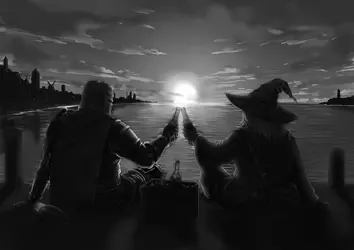
So using the black and white version of the image and referencing black and white sunset images I modify the values:
345.4.png
(again messy unfortunately)
I made the brightest part of the sun the middle. I also noticed that in general sunsets had darker clouds than what your values showed. I also darkened the back of the characters to really make the back lighting from the sun pop. I also reduced the contrast in the water and in the buildings in the back ground. For the water I just uses some grey to smooth it out a bit. For the buildings I just used your darker shadow and made the shadows more prominent.

I also used the lighter sun color and put more of it behind the bottles. This helps to also pump up the contrast between the water and the bottles helping to bring the focus bad there.


Now that the values look a bit more suited for the scene. I take the original piece and switch the layer mode to color and put it a layer above the value layer.
345.5.png
Again it looks quite messy since there are somethings not quite suited. For example I darkened the clouds rather messily, so it didn't quite map to the colored version of the image. So that's my next step is to clean that up. However just by changing the values, I think the image still looks more cohesive and suited for the scene.


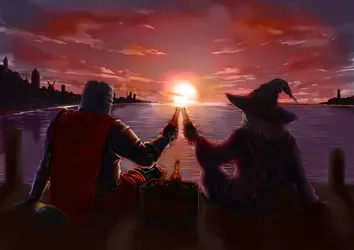
At this point though I feel the next steps are optional as I am not the best at colors, also it might have been an intentional choice for the clouds to be yellow. When looking at reference images though, clouds for sunsets were generally pink or red. Also I think reducing the yellow in the image down to the points of importance (sun, bottle, back lighting the characters). It can help promote focusing the eye there. Not to say the sky can't be the focus though.

So that's what I am doing here. I am fixing the weird shadow on the sun and reducing the yellow from the clouds down to the focal point.
345.6.png

Next I am still fixing the clouds but I feel some of the contrast was lost in the bottles so I pump that back up again by adding some darkness to the bottles which helps make them stand out.
Also I think that most of the back of the characters is rendered in a way which implies a more metallic material than what context would suggest. For example on the brim of the wizard's hat I think the thin bright line is more suited for metal, so I smooth it out and just gave a softer highlight there (sorry not sure how best to do this in your style).
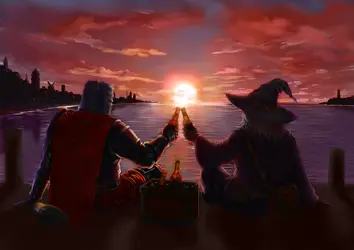
345.7.png

I also saw a tangent with the shore on the left and with the knights shoulder armor. So I made that darker. Honestly if not for the tangent I probably wouldn't have removed it, though I was also unsure of it's intent since generally in a sunset I don't think you would see a highlight there. Though I didn't think it was bad.
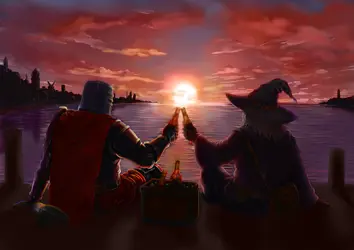
345.8.png

At this point I am just trying to fix the clouds a bit more since they still don't look the best.
345.10.png


Lastly, I felt like the knight was more saturated than the wizard which unfairly drew attention to him when I wanted both to have equal focus, so I added more shadows to his cape which I think even things out. I also made the tip of the wizard's hat a little darker to help make it stand out(though this then makes a tangent with the horizon which isn't good, but I didn't know how to fix without moving things around more).
345.11.png

Finally here are the color and values checks of this final piece:

not a bit change for this first one since I didn't change much since the initial value changes.
345.12.png

For the color check though, I do feel like the focus is significantly easier to maintain on the knight and the wizard. As there is less contrast now in the sky compared to their highlights, the sun and the bottles.
345.13.png

I don't think this is the exact end product you were going for, but hopefully this gives you some ideas on how to make something more true to your own vision. I would recommend making a thumbnail with the composition, colors and values for the scene that you want. I am not sure how easy it is to change these things on the fly with your art style, so it might be easier to make a messier smaller version which is less commitment and easier to try and get the right feel and then transition to rendering the final full piece. Usually if it looks good and clear at 1/10th of the size, it will look better when scaled up as well.
 

Archivos adjuntos

  • Screenshot from 2026-05-30 20-54-10.png
    Screenshot from 2026-05-30 20-54-10.png
    7.3 KB · Vistas: 14
  • 345.1.png
    345.1.png
    4.9 MB · Vistas: 11
Última edición:
Atrás
Top Abajo