Business Microsoft announces Windows 11, with a new design, Start menu, and more - A new version of Windows is officially on the way


Microsoft is officially confirming the name for the next release of Windows today: Windows 11. After months of teases, hints of the number 11, and a giant Windows 11 leak, Microsoft’s new operating system is official. The big focus for Windows 11 is a simplification of the Windows user interface, a new Windows store, and improvements to performance and multitasking. Windows 11 will also include support for running Android apps for the first time.
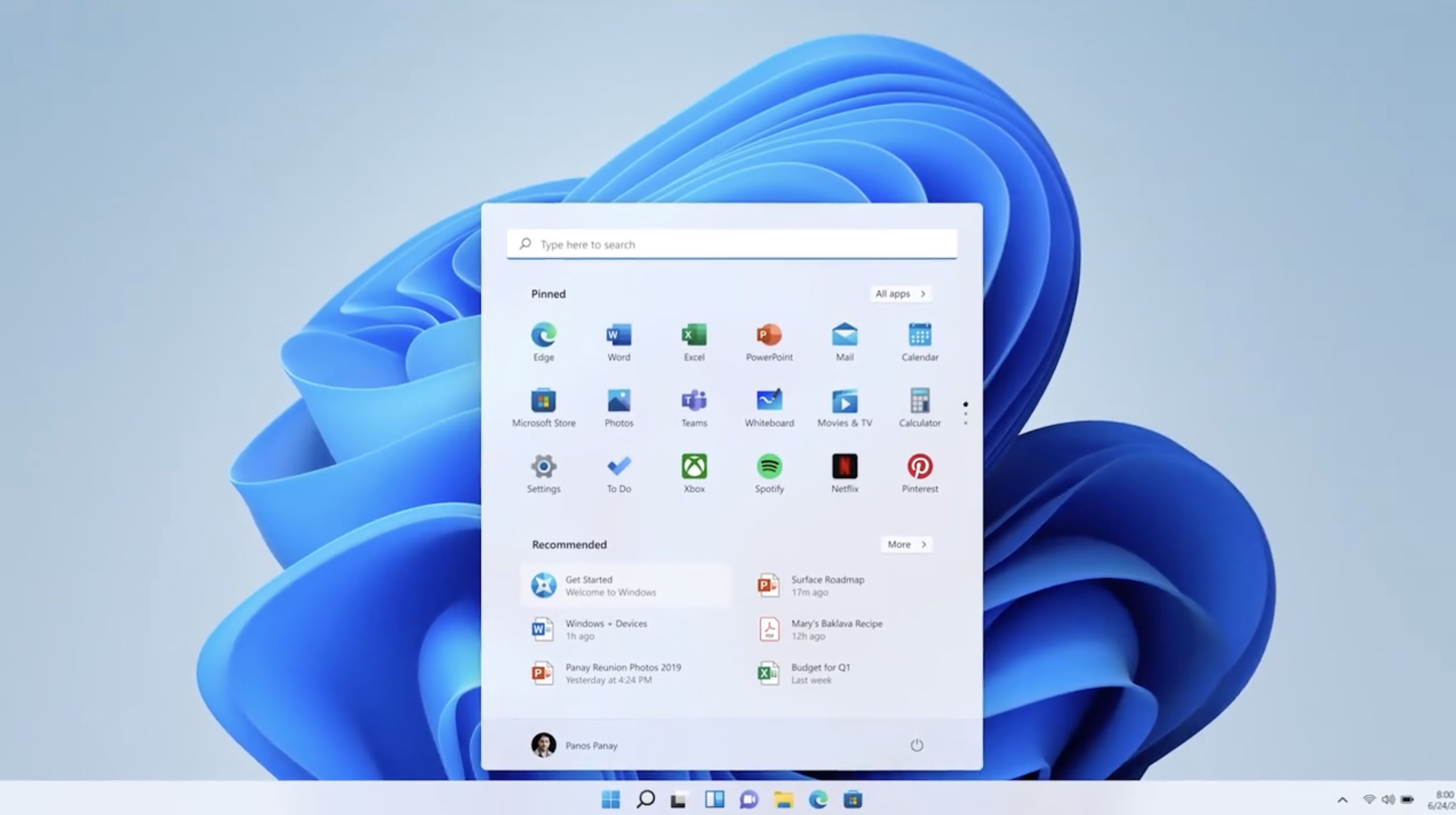
The first thing you’ll notice about Windows 11 is that it includes a new Start menu and updated Start button that are both centered on the taskbar. This UI is very similar to what we first saw in Windows 10X, a project originally planned for dual-screen devices that Microsoft eventually canceled. A lot of the UI work that went into Windows 10X is appearing in Windows 11.
windows_11_3.jpg


The new Start menu drops the Live Tiles that were originally introduced with Windows 8 and opts for more of the typical launcher you’d find in Chrome OS or Android. There are apps, recent documents, and a separate search interface. Much of the centered appearance is clearly influenced by macOS and Chrome OS, and Windows 11 also includes the rounded corners we’ve seen in both Android and iOS.
Windows chief Panos Panay says “the team has obsessed over every detail.” Windows 11 will also include updated dark and light modes that look a lot better than what we’ve seen in Windows today.
lcimg_00e7c70f_af00_4756_97d7_7b7dd6726cf8.jpg
Windows 11 Snap layouts.
There’s also something Microsoft is calling Snap Layouts, which allow you to quickly snap apps into the various modes that Windows 11 supports. This new version of Windows 11 will also remember where your apps are stored, thanks to something called Snap Groups.
It looks like a useful way to support multiple monitors and ensure that apps always open on the correct screen. That’s particularly helpful if you’re using a laptop hooked up to a monitor or a traditional desktop machine with multiple displays.
Performance is also a big focus for Windows 11. Windows updates are 40 percent smaller and more efficient as they now happen in the background. Hopefully that will mean Windows 11 doesn’t disturb you in the middle of work.
DrZo86L.png
Microsoft Teams in Windows 11.
Microsoft is also integrating Microsoft Teams directly into Windows 11 for both consumers and commercial users. Teams is integrated directly into the taskbar, allowing Windows 11 users to call friends, family, or co-workers. It’s clear that this is a big shift away from Skype, which was bundled as part of Windows 10, and there’s even a universal mute button in the system tray so you can easily mute your microphone across all apps.
Windows Widgets and touch gestures are also a big part of Windows 11. Widgets is a personalized feed, powered by AI, and it builds on the widgets we’ve seen Microsoft introduce in Windows 10. It slides in from the left-hand side of Windows 11, and you can also make it full-screen. Built-in widgets include a news feed, weather, and maps.

Interestingly, these widgets also include one that lets you tip local creators directly from within Windows 11.
lcimg_b57980d8_1322_495d_9f39_6b649ad6330c.jpg
Windows Widgets.
Microsoft is also improving the gestures you can use on tablets and the touch targets. Instead of flipping into a tablet mode, Windows 11 simply adapts to allow you to touch the OS easily.
Coupled with this are improvements to inking and voice typing. With certain pens, Windows 11 will also support haptic feedback here. That could mean we’ll see a lot of new hardware that will support these stylus changes in Windows 11.
Xbox is a big part of Microsoft, and we also got to hear from Xbox executive Sarah Bond about PC gaming with Windows 11. Auto HDR, a feature in Xbox Series X / S, will be part of Windows 11. Enabling Auto HDR will add high dynamic range (HDR) to a large number of DirectX 11 and DirectX 12 games as long as you have a compatible HDR monitor.
lcimg_bdfcdd14_0740_4bfb_8e42_882b1c76f79c.jpg
New Xbox app in Windows 11.
Microsoft is also promising speed and performance improvements for Windows 11. DirectStorage will be part of Windows 11, a big new feature from the Xbox Series X / S. DirectStorage will require the latest NVMe drives to speed up game load times on Windows 11, and game developers will need to enable this technology to boost load times further.
Xbox Game Pass is also being integrated into Windows 11, thanks to a new Xbox app that the company has been testing for months. This also includes xCloud integrated into this Xbox app, so you can stream games from Microsoft’s cloud, too.
Android_Collection_1024x683.png
The new Windows 11 app store with Android apps.
Finally, one of the biggest parts of Windows 11 is the new store and support for Android apps on Windows. The Microsoft Store is redesigned and will support a whole host of apps that haven’t typically been available in the Windows app store. That includes apps from Adobe Creative Suite, and Android apps including TikTok and Instagram.
Developers can use their own “commerce engines,” and Microsoft won’t take a cut; devs can even use their own payment systems if they want to. “Windows has always stood for sovereignty for creators,” says Microsoft CEO Satya Nadella.
The biggest news here is that Windows 11 will also run Android apps. Microsoft has partnered with Amazon and Intel to make this a reality, and Windows 11 will be using Intel Bridge technology to bring this to life. Microsoft demonstrated TikTok and other Android apps running alongside Windows apps on Windows 11, and the company plans to share more information on this “in the coming months.”
There’s no release date for Windows 11 yet, but Microsoft has promised to make it available as a free upgrade to Windows 10 users this holiday. We’re expecting Windows 11 to appear at some point in October, alongside new hardware running the operating system.

https://www.theverge.com/2021/6/24/22546791/microsoft-windows-11-announcement-features-updates

 
One thing to add: the Win10 update in the Fall will likely be the last 10 build. Obviously it will continue to be supported for a few years, but this will be it as far as major changes go.
 
There's a thread on this over at the Internet & Technology board. I posted the live stream event that took place today and edited out the stream timer for both the beginning and ending portions

Some things to note, it got leaked some time ago before the live event announcement, and anons have been digging into it to find out exactly what's been going on behind the scenes regarding this thing. What was found was the following...
  • The screensaver settings still has the same design it has had since XP, CTR monitor included
  • The installer introduced with Vista is still being used and has the same Win 7 theme used since Win 8
  • The control panel they have been trying to kill for years got new icons
  • The computer management tool still has the same design and icons it had on Windows 9X
  • The remote desktop client that was added fuck knows how long ago still has Vista/7 icons and UI
  • The sound settings tool still has it's Win95 looks, icon included
  • All the programs that MS hasn't been able to remove or update were moved to a containment folder that only makes more obvious how they have failed multiple times to make things consistent (just look at that mix of XP, Vista, 7, 8 and 10 icons)
  • The explorer still uses the "ribbon" bar introduced with Vista (also still no tabs)
  • Some people have been benchmarking CPU heavy games on it, and stuff like Team Fortress 2 had a minimum FPS increase up to 100
Screenshots attached
 

Archivos adjuntos

  • 11-01.jpg
    11-01.jpg
    574.6 KB · Vistas: 46
  • 11-02.png
    11-02.png
    1.7 MB · Vistas: 39
  • 11-03.jpg
    11-03.jpg
    156.4 KB · Vistas: 34
  • 11-04.jpg
    11-04.jpg
    133.4 KB · Vistas: 36
  • 11-05.jpg
    11-05.jpg
    190.3 KB · Vistas: 33
  • 11-06.jpg
    11-06.jpg
    73.4 KB · Vistas: 34
  • 11-07.jpg
    11-07.jpg
    121.8 KB · Vistas: 33
  • 11-08.jpg
    11-08.jpg
    156.7 KB · Vistas: 29
  • 11-09.jpg
    11-09.jpg
    167 KB · Vistas: 28
  • 11-10.jpg
    11-10.jpg
    118 KB · Vistas: 34
  • 11-11.jpg
    11-11.jpg
    114.7 KB · Vistas: 36
  • 11-12.png
    11-12.png
    34.4 KB · Vistas: 38
  • 11-13.png
    11-13.png
    32.8 KB · Vistas: 47
There's a thread on this over at the Internet & Technology board. I posted the live stream event that took place today and edited out the stream timer for both the beginning and ending portions

Some things to note, it got leaked some time ago before the live event announcement, and anons have been digging into it to find out exactly what's been going on behind the scenes regarding this thing. What was found was the following...
  • The screensaver settings still has the same design it has had since XP, CTR monitor included
  • The installer introduced with Vista is still being used and has the same Win 7 theme used since Win 8
  • The control panel they have been trying to kill for years got new icons
  • The computer management tool still has the same design and icons it had on Windows 9X
  • The remote desktop client that was added fuck knows how long ago still has Vista/7 icons and UI
  • The sound settings tool still has it's Win95 looks, icon included
  • All the programs that MS hasn't been able to remove or update were moved to a containment folder that only makes more obvious how they have failed multiple times to make things consistent (just look at that mix of XP, Vista, 7, 8 and 10 icons)
  • The explorer still uses the "ribbon" bar introduced with Vista (also still no tabs)
  • Some people have been benchmarking CPU heavy games on it, and stuff like Team Fortress 2 had a minimum FPS increase up to 100
Screenshots attached
I don’t know why people are sperging about this shit.
 
So much for Windows 10 being a rolling release that will last forever.
Hey c'mon, since when have Big Tech ever lied to us about anything?
I don’t know why people are sperging about this shit.
Because it's funny as hell that the #1 OS used around the world has parts still stuck in the 1990s. That and Microsoft poorly trying to imitate Apple.
 
Because it's funny as hell that the #1 OS used around the world has parts still stuck in the 1990s. That and Microsoft poorly trying to imitate Apple.
The Apple part sure, everyone point and laugh; but I’m a big believer in “if it isn’t broke, don’t fix it”. Who cares if some obscure menu in the Recycling Bin isn’t up to modern globohomo art standards?
 
Hey c'mon, since when have Big Tech ever lied to us about anything?
It is Microsoft. What was their last successful new product aimed at the consumer market? The Xbox? That was 20 years ago.

The Apple part sure, everyone point and laugh; but I’m a big believer in “if it isn’t broke, don’t fix it”. Who cares if some obscure menu in the Recycling Bin isn’t up to modern globohomo art standards?
I wouldn't mind if they had the past themes with the icons etc.
 
I’d still rather use it over any Linux distro, but I’m constantly proven that moving to Mac was indeed the right choice.
 
Atrás
Top Abajo